
On This Page
Prime Progress Bar
What it is
Prime Progress Bar draws a single linear bar showing a value's progress towards a goal. There's no charting engine involved — it's a styled CSS bar, built as a real, accessible progress indicator rather than a drawn image. It's the simplest module in Prime Charts: one value, one goal, one bar.
When to use it
Use it for a single value read as progress towards a target — a fundraising total against a goal, a completion percentage, a quota. If you need to show several values side by side, or a value with no natural “goal,” Prime Stat Value or Prime Gauge Chart are better fits.
Data you need
Just a value and a goal:
| Field | Example |
|---|---|
| Value | 750 |
| Goal (Max) | 1000 |
Adding data
Data Source (Data Source group) switches between Static and REST/JSON URL for the value itself. Goal (Max) is set independently of Data Source, in both modes.
Static table
With Data Source set to Static, type the number into Value (Value group).
CSV import (canvas control)
With Data Source set to Static, an Import CSV… button appears directly above the bar in the builder canvas — not in the Content tab's field list. Reading a .csv file (2 MB max) happens entirely in your browser, and the first numeric value found is written into Value only. Goal (Max) is never touched by CSV import — there's no reliable way to tell which cell in an arbitrary file represents a goal, so set it by hand.
REST/JSON
With Data Source set to REST/JSON URL, Endpoint URL, Value Path, and Refresh (minutes) appear instead. Value Path uses dot notation, e.g. data.raised.
Settings that change the result
Values group — Show Value Label, Value Display (Value / Percentage / Both — Percentage expresses Value as its share of Goal (Max)), Decimal Places, Value Prefix, Value Suffix.
Bar, Chart Animation, Value Text groups (Design tab) — the bar's own height and corner radius, its fill and track colours, whether the fill animates in on load and its speed, and the value label's own typography.
Header, Title Text, Subtitle Text groups — an optional title/subtitle above the bar.
Front-end extras
No export toolbar — there's no chart to export. The bar is a real ARIA progressbar (role="progressbar" with the current value, minimum, maximum, and a readable text description all set), so a screen reader already reports genuine progress information without any extra work.
Common mistakes
- Expecting CSV import to also set Goal (Max). It only ever writes Value; the goal is always set by hand.
- Setting Goal (Max) to 0. There's nothing for Value to show progress towards.
- Assuming the bar needs extra accessibility markup. It doesn't — the progressbar semantics are already there.
Figures

Front-end render, bar partway filled.
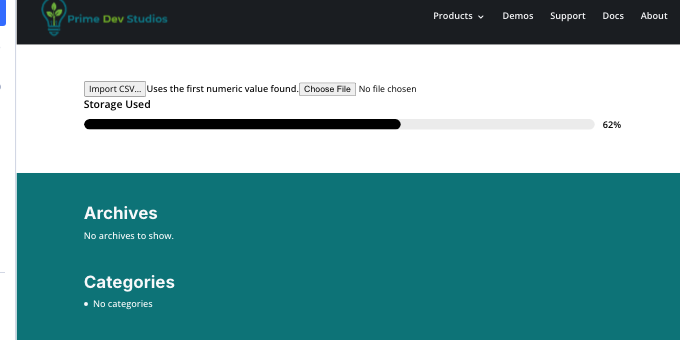
Builder canvas: the Import CSV… button above the bar.
Get Prime Charts
One plugin for Divi 5. Seven ways to chart your data.
- Requires Divi 5.6.2+, WordPress 6.0+, PHP 7.4+
- Translation-ready · GPL-2.0-or-later