
On This Page
Prime Stat Details
What it is
Prime Stat Details is a label/value list tile — a short table of facts (label on the left, value on the right) rather than a chart. Like Prime Stat Value, there's no charting engine involved: it's styled text, one row per label/value pair.
When to use it
Use it for a short list of related facts you want displayed together as one tile — specs, a small comparison table, a handful of named figures. If you only have one figure, Prime Stat Value is a better fit; if you have a real table you want plotted, use one of the chart modules instead.
Data you need
One label, one value, per row:
| Label | Value |
|---|---|
| Revenue | $120,000 |
| Growth | 18% |
There's no built-in row limit on this module's Details Rows field, unlike the table-shaped chart modules — as implemented, it renders every row you give it.
Adding data
Data Source (Data Source group) switches between Static and REST/JSON URL. Switching modes never deletes what's in the other mode.
Static table
Paste or type your rows into Details Rows (Details group) — one label, value pair per line, comma- or tab-separated. Unlike the chart modules, there's no “first row is header” concept here: every line is read as a real label/value row, including the first.
CSV import (canvas control)
With Data Source set to Static, an Import CSV… button appears directly above the tile in the builder canvas — not in the Content tab's field list. Reading a .csv file (2 MB max) happens entirely in your browser, and the whole file's contents are written straight into Details Rows, exactly as if pasted by hand. Because there's no header-row handling, a CSV whose first row is column names (e.g. “Label,Value”) will show up as a literal extra row — delete it in Details Rows afterward if your file has one.
REST/JSON
With Data Source set to REST/JSON URL, Endpoint URL, Label Path, Row Value Path, and Refresh (minutes) appear instead. This module resolves one label/value list from a single Label Path / Row Value Path pair — there's no numbered second, third, or further series slot the way the chart modules have.
Settings that change the result
Details Style, Title Text, Subtitle Text groups (Design tab) — the label and value text colours, whether row dividers show and their colour, and typography for the tile's own optional Title/Subtitle.
Front-end extras
No export toolbar — there's no chart to export. Every label, value, title, and subtitle is real, visible text in the page, so a screen reader already reads the actual content without any extra markup.
Common mistakes
- Pasting or importing a CSV with a header row. It renders as a real (wrong-looking) row — there's no toggle to skip it the way the chart modules have; remove it by hand.
- Expecting a second value column from REST/JSON. Only one Label Path / Row Value Path pair exists — there's no multi-series slot pattern here.
- Assuming a row limit applies. As implemented, this module has none — don't assume the 500-row chart-module cap applies here too.
Figures

Front-end render, tile with several label/value rows and dividers on.
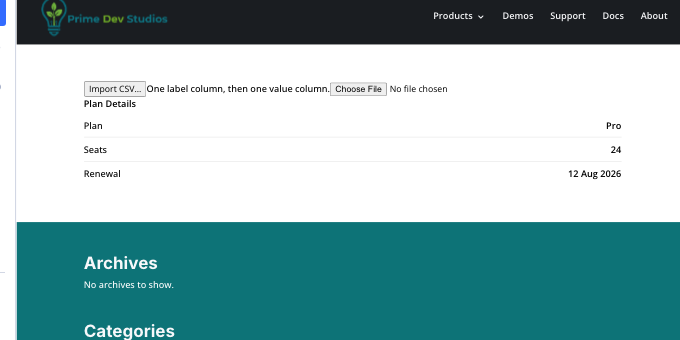
Builder canvas: the Import CSV… button above the tile.
Get Prime Charts
One plugin for Divi 5. Seven ways to chart your data.
- Requires Divi 5.6.2+, WordPress 6.0+, PHP 7.4+
- Translation-ready · GPL-2.0-or-later